Add your statement.
Import a supported CSV or text PDF into the full app. Confirm a format choice if dates, currency or amounts are ambiguous.

Your statement. A clearer picture.
See money in, money out and spending categories from a supported bank statement.
Free fictional demo. No card needed. Full access is not on sale yet.
From transactions to understanding
A statement shows the details. Seeing what came in, what went out and where it went takes another step.
Where Did My Money Go? brings readable, included transactions into a spending overview. Start with the totals, review the categories, and check anything that needs attention.
View product details →How it works
Start with a supported statement. Keep the original nearby so you can check the result.
Import a supported CSV or text PDF into the full app. Confirm a format choice if dates, currency or amounts are ambiguous.
Review money in, money out and suggested categories. Flagged or excluded rows stay visible for review.
Correct a category when needed and inspect unfamiliar outflows. Review one account at a time, with currencies kept separate.
Inside the overview
See totals and the difference for included transactions, with a separate view for each currency.
Start with suggested categories. Change them when a description needs context, without losing the transaction from the totals.
Review larger expenses and possible repeated-payment patterns. A repeated payment is not automatically a subscription.
Check flagged, unreadable and excluded rows. An overview can cover only part of a statement, so review what was included.
A fictional example
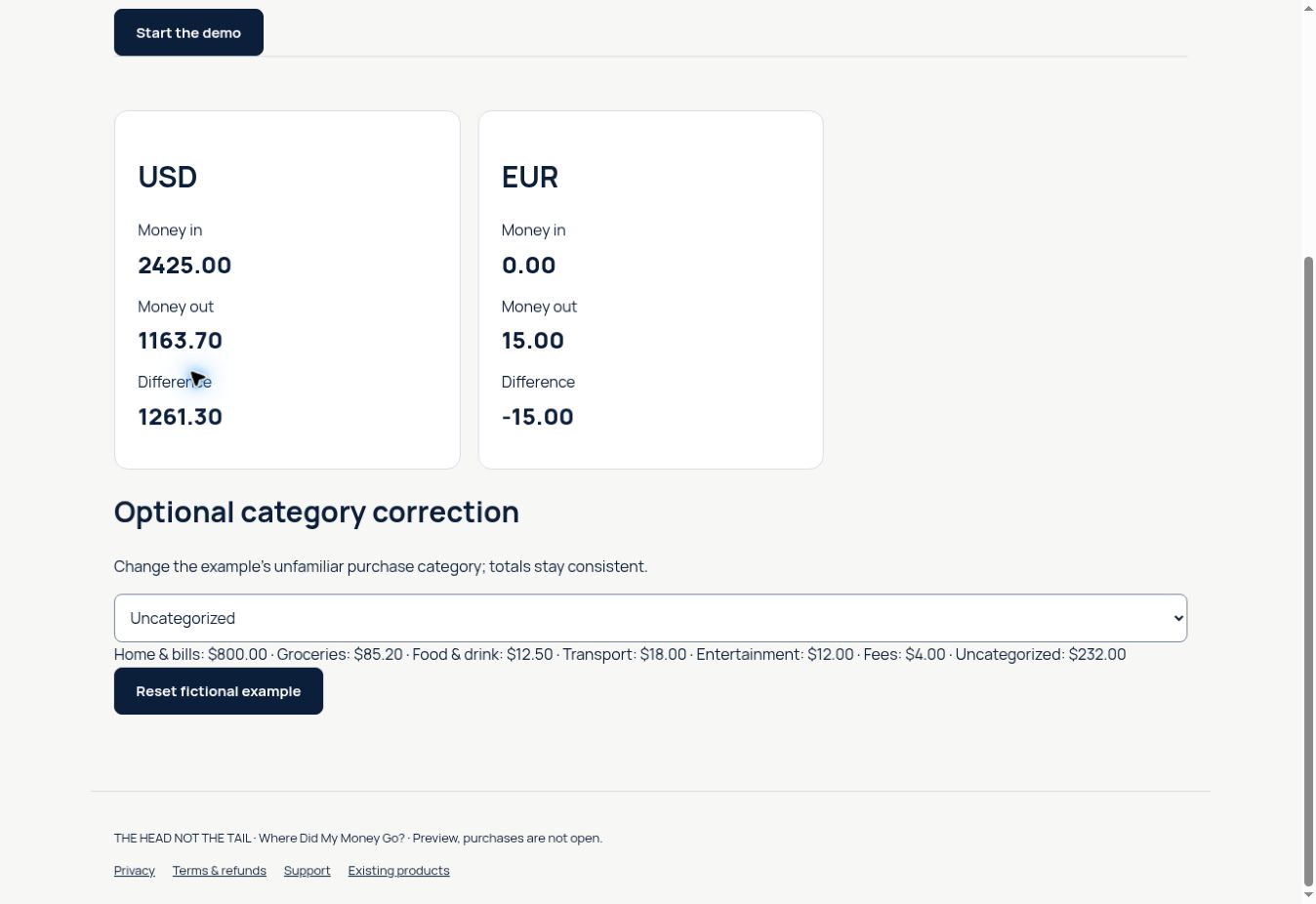
An unfamiliar $32 purchase starts as Uncategorized. Change it to Shopping in the demo and see the category totals update.
The amount does not change. Neither do money in and money out.
Try the category correction →| Transaction | Amount |
|---|---|
| Example salary | +$2,400.00 |
| Example rent | −$800.00 |
| Example supermarket | −$85.20 |
| Example unfamiliar purchase | −$32.00 |
These are selected rows, not the complete demo. The full USD example shows $2,425.00 in and $1,163.70 out. The $1,261.30 difference is included cash flow, not a bank balance.
Know the scope
A simple planned offer
Explore the fictional example today. Full access is planned as a one-time purchase, after checkout and access testing are complete.
No subscription is currently offered. Final access duration and purchase terms will be confirmed before sales open.
Start with the free demo →Browser access to the tested version, a short guide and fictional example files.
Buy — $35.99Purchases are closed. No payment will be taken. This page does not promise lifetime hosting or every future upgrade.
A few good questions
Know the formats, the limits and the current availability.
Contact & support →In the full app, choose a supported statement, review money in, money out and suggested spending categories, then correct anything that needs attention. Check the included and excluded rows against your original statement. The free demo uses fictional data. Read the guide →
Recognized UTF-8 CSV exports and three specific text-PDF layouts are fixture-tested. Scanned, encrypted, rotated-text and unrecognized PDFs are not supported. Limits: 12 files, 2,000 combined rows; CSV 5 MB per file; PDF 10 MB and 25 pages per file. Check formats and limits →
No. The app does not connect to your bank. You choose a supported statement file. It cannot cancel payments or subscriptions for you.
No monthly subscription is planned. The price is $35.99 USD for a one-time purchase. Purchases remain closed until checkout and customer access pass their final tests. This is not a promise of unlimited lifetime hosting or all future upgrades.
The planned offer includes browser access to the tested application, a short guide and fictional example files. Final access duration and purchase conditions must be confirmed before sales open. No payment is currently accepted. View the product →
Customer access is being prepared. After purchase, select Open My App in your Lemon Squeezy receipt and enter your license key once to activate this device. No separate account or password. The full purchase test is still pending; do not purchase again to fix an access problem. Check customer access →
Return on your device while your secure session is valid. If it expires or you change browsers, use your purchase key again. For help finding your purchase, use Lemon My Orders or contact support. Returning access is still being tested. Open Sign In →
When customer email sign-in is available, request a fresh link from Sign In and use the newest email. Do not share the link. This recovery flow is still awaiting end-to-end verification; for an existing order, use the help details on your receipt.
Yes. Review the suggested category and change it when needed. Changing a category updates the category breakdown without changing the transaction amount or money-in and money-out totals. Uncategorized rows still count in those totals.
An unsupported layout may not import, or some rows may be excluded. Review warnings and included rows; do not treat a partial overview as the complete statement. Check for a supported CSV export. Support does not need your bank statement. Review supported formats →
New purchases are closed. Final refund conditions will be published before checkout opens. An existing order keeps the terms that accompanied it. Use its original receipt for help, and include an order ID rather than payment-card details. Read the current refund policy →
Use the contact form or Contact Support in the Help Center. We reply to the email address you provide. Include what happened and your browser, but never send bank statements, passwords or card details. Contact Support →
No. Money in minus money out describes the included transactions. It is not your current balance, profit or a forecast. Currencies stay separate. Review excluded rows.
The current processing code works in page memory. Reloading or clearing removes imported rows and edits from the page. Keep your original files. This is not a backup service or a claim that every browser or hosting activity is private. Read the privacy notice →
The website adapts to smaller screens. Full-app import with a real iPhone Safari file picker is still awaiting acceptance testing. Downloaded HTML on iPhone and offline reopening are not supported.
Start with a clear example
Explore the overview. Change a category. Reset and try again.